name: Docker

on: [workflow_dispatch, push]
    # 手动启动, 每次推送后触发
env:
  # 设置 docker 镜像名
  IMAGE_NAME: blog

jobs:
  # 运行测试,如果需要的话,将注释取消掉并且修改为自己需要的内容
  # See also https://docs.docker.com/docker-hub/builds/automated-testing/
  #  test:
  #    runs-on: ubuntu-latest
  #
  #    steps:
  #      - uses: actions/checkout@v2
  #
  #      - name: Run tests
  #        run: |
  #          if [ -f docker-compose.test.yml ]; then
  #            docker-compose --file docker-compose.test.yml build
  #            docker-compose --file docker-compose.test.yml run sut
  #          else
  #            docker build . --file Dockerfile
  #          fi

  # Push image to GitHub Packages.
  # See also https://docs.docker.com/docker-hub/builds/
  push:
    # 如果需要在构建前进行测试的话需要取消下面的注释和上面对应的 test 动作的注释。
    # needs: test

    runs-on: ubuntu-latest
    steps:
      - uses: actions/checkout@v2
        # 构建镜像,指定镜像名
      - name: Build image
        run: docker build . --file dockerfile --tag $IMAGE_NAME
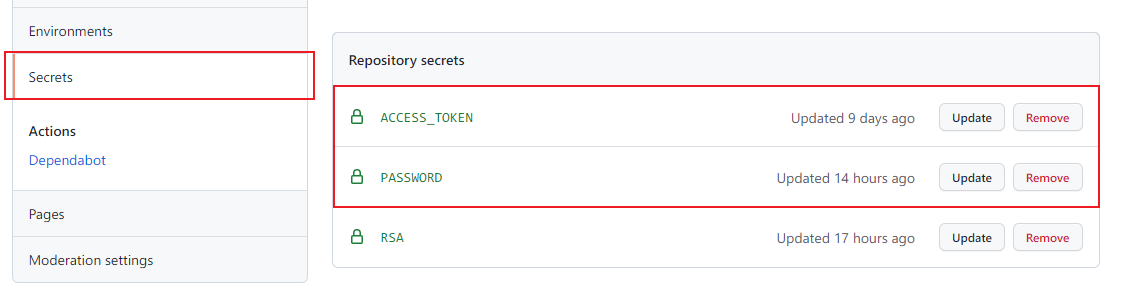
        # 登录到 dockerhub,使用 GitHub secrets 传入账号密码,密码被加密存储在 GitHub 服务器,添加方法见下图。
      - name: Log into registry
        run: echo "$" | docker login -u xulezuo --password-stdin

      - name: Push image
        run: |
          # 拼接镜像 id,这个镜像 id 就是在使用 docker 镜像时 pull 后面的名字。
          IMAGE_ID=xulezuo/$IMAGE_NAME
          # 将所有的大写字母转为小写
          IMAGE_ID=$(echo $IMAGE_ID | tr '[A-Z]' '[a-z]')
          # 从 GitHub.ref 中取出版本
          VERSION=$(echo "$" | sed -e 's,.*/\(.*\),\1,')
          # 从 tag 名字中替换 v 字符
          [[ "$" == "refs/tags/"* ]] && VERSION=$(echo $VERSION | sed -e 's/^v//')
          # Use Docker `latest` tag convention
          [ "$VERSION" == "master" ] && VERSION=latest
          echo IMAGE_ID=$IMAGE_ID
          echo VERSION=$VERSION
          # 设置镜像 id 和版本号
          docker tag $IMAGE_NAME $IMAGE_ID:$VERSION
          # 进行 push
          docker push $IMAGE_ID:$VERSION

      - name: Deploy
        uses: appleboy/ssh-action@master # 使用ssh链接服务器
        with:
         host: '42.194.131.197'
         username: 'root'
         password: $
         port: 22
         script: | # 执行命令(运行到服务器)cd:要确保服务器有这个目录; wget:下载上一步的release到服务器; tar:解压; 安装依赖;启动服务
          docker stop blog
          docker rm blog
          docker pull xulezuo/blog
          docker run --name blog -p 80:80 -v /data/nginx/conf/nginx.conf:/etc/nginx/nginx.conf -v /data/nginx/log:/var/log/nginx -v /data/nginx/conf.d/default.conf:/etc/nginx/conf.d/default.conf -d xulezuo/blog